
How Uitly Works: URL Shortener Explained Simply
I still remember the day I sent a product link to my cousin in Pune and she called me back laughing — “Anvika, this URL is longer than my college assignment.” She wasn’t wrong. It was one of those Amazon links that wraps around twice on a mobile screen. That’s actually what pushed me deep into the world of URL shorteners, and eventually to building Uitly.
If you’ve ever wondered exactly how a URL shortener works under the hood — not just what it does, but the actual mechanics of Uitly’s link processing — you’re in the right place. I’ll walk you through it the way I’d explain it to a friend, with no unnecessary jargon.
At a Glance
| Point | What You Need to Know |
|---|---|
| What Uitly does | Converts long, complex URLs into short, shareable links |
| How it redirects | HTTP 301/302 redirect triggered by a lookup in a fast database |
| Time to redirect | Typically under 100 milliseconds |
| Custom links | Yes — you can brand your short link (e.g., uitly.link/yourname) |
| Analytics | Click tracking, device, geography, referrer — all logged |
| Best for | Social media, WhatsApp campaigns, bio links, QR codes |
What Is a URL Shortener, Really?
A URL shortener is essentially a redirect machine. You give it a long destination URL; it assigns a short alias to it; and any time someone clicks that alias, they get instantly forwarded to the original destination. Simple concept. But the engineering behind making that happen reliably, fast, and at scale is genuinely impressive.
Uitly works on this exact principle — but with a layer of intelligence on top that makes it more than just a redirect service. Think of it as a smart traffic director for your links.
My Personal Experience With URL Redirection
When I first started testing URL shorteners for Uitly, I made a classic mistake that cost me a whole campaign’s worth of data. I used a free shortener for a sponsored Instagram post. Within two days, the service went down — and every link in my posts was dead. Hundreds of clicks, zero data, zero destination.
That experience taught me the most important thing about URL shorteners that nobody talks about: uptime and ownership matter more than price. A free tool with 99% uptime sounds fine until that 1% hits during your biggest campaign of the year.
Lesson Learned Never use a “free forever” anonymous shortener for anything with real traffic behind it. The moment the service folds, your links die with it. Always use a service where you own the data.
After that, I became obsessive about understanding every layer of how link redirection works — which ultimately shaped how I built Uitly.
How Uitly’s Link Processing Works Step by Step
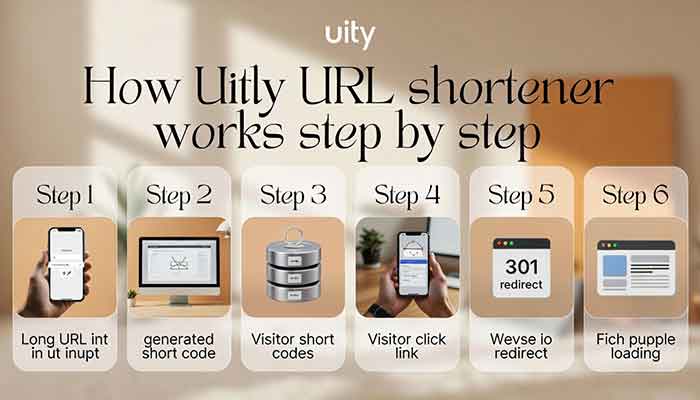
Here is the exact flow that happens behind the scenes every single time you create or click a short link on Uitly:
- You submit your long URL. You paste the destination URL into Uitly’s dashboard. The system validates it — checks it’s a real URL, not malicious, and reachable.
- A unique short code is generated. Uitly’s algorithm creates a random (or custom, if you specify one) alphanumeric slug — like uitly.link/abc3k. This slug is unique across the entire database.
- The mapping is stored. A record is written to Uitly’s database: short code abc3k → long URL. This lookup needs to be blazing fast because it happens on every single click.
- Someone clicks your short link. Their browser sends a request to Uitly’s server: “What lives at uitly.link/abc3k?”
- The server performs a lookup. Uitly finds the matching destination in milliseconds — often using in-memory caching (Redis-style) for popular links so the database isn’t hit every single time.
- HTTP redirect fires. The server returns a 301 or 302 redirect response with the destination URL. The browser follows it automatically. The user lands on the original page.
- Analytics are logged. Before sending the redirect, Uitly quietly records the click timestamp, device type, browser, geographic location, and referrer. This all happens without slowing down the redirect.
The whole thing — steps 4 through 7 — happens in under 100ms in normal conditions. You don’t notice it as a user. But that split-second is where all the magic lives.
301 vs 302 Redirect — Does It Matter?
Yes, it does. A 301 redirect tells browsers (and Google) “this is a permanent move.” Browsers cache it, which means after the first click, the user might not even hit Uitly’s server — their browser goes straight to the destination. That’s fast, but it means you lose analytics data on repeat visitors from the same browser.
A 302 redirect says “temporary move.” Every click hits Uitly’s servers, analytics stay complete, and you can change the destination anytime. Uitly uses 302 redirects by default so your data is always accurate and your links stay flexible.
Read More: MDN Web Docs on HTTP redirects — https://developer.mozilla.org/en-US/docs/Web/HTTP/Guides/Redirections
How to Create Short Links on Uitly
Creating a short link on Uitly is genuinely a 30-second process. Here’s how it works:
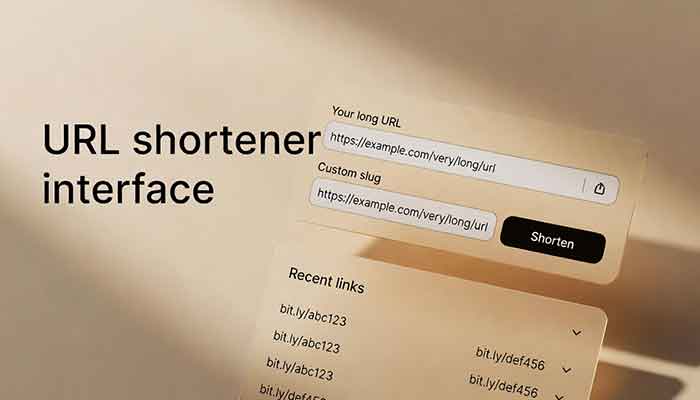
- Log into your Uitly dashboard and click New Link
- Paste your destination URL in the input field
- Optionally set a custom slug (e.g., uitly.link/diwali-sale)
- Add a campaign tag if you want to track this link separately
- Hit Create — your short link is live immediately
The custom slug feature is something I’m particularly proud of. It’s not just vanity — branded links consistently get higher click-through rates than random-character links. When someone sees uitly.link/sale50 vs bit.ly/3xQ9mRj, they trust the first one more.
Read More: What is a URL Shortener? A Simple Guide to Using Uitly
Uitly vs Other URL Shorteners — Feature Comparison
| Feature | Uitly | Bitly (Free) | TinyURL | Rebrandly |
|---|---|---|---|---|
| Custom slug | ✓ Yes | ✗ Paid only | ✓ Yes | ✓ Yes |
| Click analytics | ✓ Full | ✓ Limited (free) | ✗ None | ✓ Full |
| QR code generation | ✓ Yes | ✗ Paid | ✗ No | ✓ Yes |
| Link expiration control | ✓ Yes | ✗ No | ✗ No | ✓ Paid only |
| Made for Indian users | ✓ Yes | ✗ No | ✗ No | ✗ No |
Honestly, the “made for Indian users” row matters more than it might seem. Uitly’s servers are optimized for latency in India, the dashboard supports INR pricing, and the support team actually responds in a reasonable timezone. These are small things that add up when you’re running a campaign and need help at 11 PM IST.
Common Problems & Practical Solutions

Problem 1: My Short Link Returns a 404 Error
This almost always means you copied the short code incorrectly — a missing character, an extra space, or a capital where there should be lowercase. Short codes on Uitly are case-sensitive. Double-check the full link and try again from the dashboard’s copy button rather than typing it manually.
Problem 2: Clicks Aren’t Showing in Analytics
If you’re using a 301 redirect and testing from the same browser repeatedly, your browser may be caching the redirect and bypassing Uitly’s server entirely. Test in an incognito window or a different browser to get an accurate click registered. Uitly’s default 302 mode avoids this — confirm your setting in the link’s advanced options.
Problem 3: WhatsApp Is Showing a Link Preview for the Wrong Page
WhatsApp scrapes Open Graph metadata from the destination URL, not the short link. If the destination page has missing or incorrect OG tags, the preview will look wrong or blank. The fix lives at the destination — update the page’s meta title, description, and image tags.
Problem 4: I Can’t Use My Preferred Custom Slug — It Says “Taken”
Common slugs like /sale, /offer, /home get claimed fast. Uitly reserves some slugs for system use as well. Try adding a year, brand name, or campaign identifier — /diwali2026 or /anvika-blog tends to work better than generic words. You can also check slug availability before finalizing your campaign name.
Frequently Asked Questions
What happens to my short link if Uitly goes down?
Uitly maintains high-availability infrastructure with redundancy. In the unlikely event of downtime, links may temporarily not redirect. This is why we maintain a public status page and send proactive alerts for any scheduled maintenance — your campaigns won’t be blindsided.
Does using a short link hurt my SEO?
For your own website’s SEO, short links used in external channels (social media, WhatsApp, email) do not pass significant link equity to your site either way. Google generally follows redirects, but for backlink-building purposes, always link directly. Uitly short links are best for tracking and shareability, not SEO link building.
Can I change the destination URL after creating a short link?
Yes — this is one of Uitly’s most useful features. You can update the destination of any active link from your dashboard at any time. The short link stays the same; only where it points changes. This is ideal for seasonal campaigns where the landing page changes periodically.
How does Uitly track clicks without using cookies?
Uitly’s analytics are server-side. When a click hits our servers, we log the request metadata — IP-derived geography, user-agent string (for device/browser detection), and referrer header — before issuing the redirect. No cookie is placed on the user’s browser, making Uitly’s tracking inherently privacy-friendly and compliant with most regional data regulations.
Is there a limit to how many links I can create on Uitly?
Free accounts have a generous link creation limit suitable for personal use. Paid plans offer unlimited links, advanced analytics, team collaboration, and API access. Check the current plan details on the Uitly pricing page for specifics.
Conclusion — My Final Take
A URL shortener is deceptively simple on the surface but genuinely thoughtful engineering underneath. What looks like a short string of characters is actually a carefully managed database record, a real-time lookup, a redirect response, and a data logging event — all completing in under a second, silently, every single time someone taps your link.
What I want you to take away from this: the tool you choose for URL shortening matters. It affects your analytics integrity, your brand perception, and — as I learned the hard way — the reliability of every link you’ve ever sent out into the world.
Uitly was built because I couldn’t find a URL shortener that felt like it was designed for people running real campaigns in India. Fast, reliable, with actual analytics and a support team that doesn’t sleep in a different timezone.
If you’ve been using a generic free shortener and wondering why your link data feels incomplete — I’d genuinely encourage you to give Uitly a try. You can create your first link in under a minute, no credit card required.
I’d love to know: what’s the most annoying thing about URL shorteners you’ve used before? Drop it in the comments — I read every single one.
Start Shortening with Uitly
Create your first branded short link in 30 seconds. Free to start, no credit card needed. Try Uitly Free
Ever wondered what actually happens when someone clicks a short link? In this guide, I break down exactly how Uitly works — from URL redirection to click tracking — and show you how to create short links that are fast, branded, and built to last.